Skip to content
Built for expedited freight carriers

The flat-fee TMS
built for expedited fleets.

Dispatch, billing, driver pay, and compliance for Sprinter, cargo-van, and small-truck operations.

$150 / month, flat. Unlimited users. Unlimited trucks.

No credit card required · Cancel anytime

Built for small-to-mid expedited fleets — Sprinter vans, cargo vans, small box trucks

An overwhelmed dispatcher's desk piled with paper rate confirmations, sticky notes, and an old laptop
The Problem

Running an expedited fleet on Excel is costing you money.

Three places it bleeds out before you ever notice.

Late billing → slow cash

When invoices wait until Friday paperwork day, your DSO stretches by 7–14 days. Working capital sits in your filing cabinet instead of your account.

Manual paperwork → lost hours

Re-typing every rate confirmation, settlement, and POD eats 10–20 hours of dispatcher time per week — and creates errors you'll fight about later.

Settlement disputes → drivers walk

A $50 disagreement on Friday's settlement is enough for an expedited driver to take their van to the next fleet. Replacing one driver costs $5K+ in recruiting, training, and missed loads.

The Fix

From bleeding to billed in three steps.

Each gap above maps to a feature LoadKeeper ships today — plus a dozen more workflows you'll meet below.

Fixes #01 · Late billing

Bill the day a load is delivered.

Auto-generate invoices the moment a load is marked delivered. Email straight from your inbox via Gmail OAuth. No more “Friday paperwork day.”

Fixes #02 · Manual paperwork

AutoLoad parses every rate-con.

Drop the broker's PDF; AI fills in origin, destination, dates, broker, price, and stops. Five minutes of typing becomes a few seconds of confirming.

Fixes #03 · Settlement disputes

Statements drivers can read.

Per-load line-item statements with every adjustment, deduction, and quick-pay rate spelled out. The pay matches what the driver expected — no Friday-afternoon arguments.

What LoadKeeper Does

One system from rate confirmation to payment.

Four pillars, working together. No bolt-on tools. No double entry.

Dispatch & Loads

From rate confirmation to delivered POD — multi-stop, multi-broker, real-time status.

  • Multi-stop pickup & delivery
  • Truck availability map
  • Driver assignment in one click
  • Load update audit trail

Billing & Cash Flow

Invoice the moment a load delivers. Track every broker, every factoring slice, every payment.

  • Auto-generate invoices from loads
  • Multi-broker, multi-factoring
  • PDF export & email delivery
  • Aged-receivable reporting

Driver & Owner-Op Pay

Settlements your drivers can read. Adjustments, deductions, quick-pay — all on the statement.

  • Per-load driver pay tracking
  • Owner-op carrier statements
  • Adjustments & deductions
  • Quick-pay & factoring rates

Compliance & Safety

Stop a parked-truck day before it happens. License, medical, and migration alerts surface before they expire.

  • License & migration expiration alerts
  • Insurance & maintenance records
  • Accident & citation logs
  • Safety reports per driver / truck
How It Works

From rate confirmation to paid invoice.

A workflow expedited dispatchers actually run on, every day.

1

Add the load

Drop the rate confirmation PDF; AutoLoad extracts stops, dates, broker, and price.

2

Dispatch & track

Find the right truck on the availability map, assign the driver, and watch status from booked to delivered — so when the broker calls, you already know.

3

Bill & settle

Auto-generate the invoice from the delivered load. Run driver and owner-operator statements in the same click.

4

Get paid

Email the invoice (Gmail OAuth) and track payment until it lands in your account.

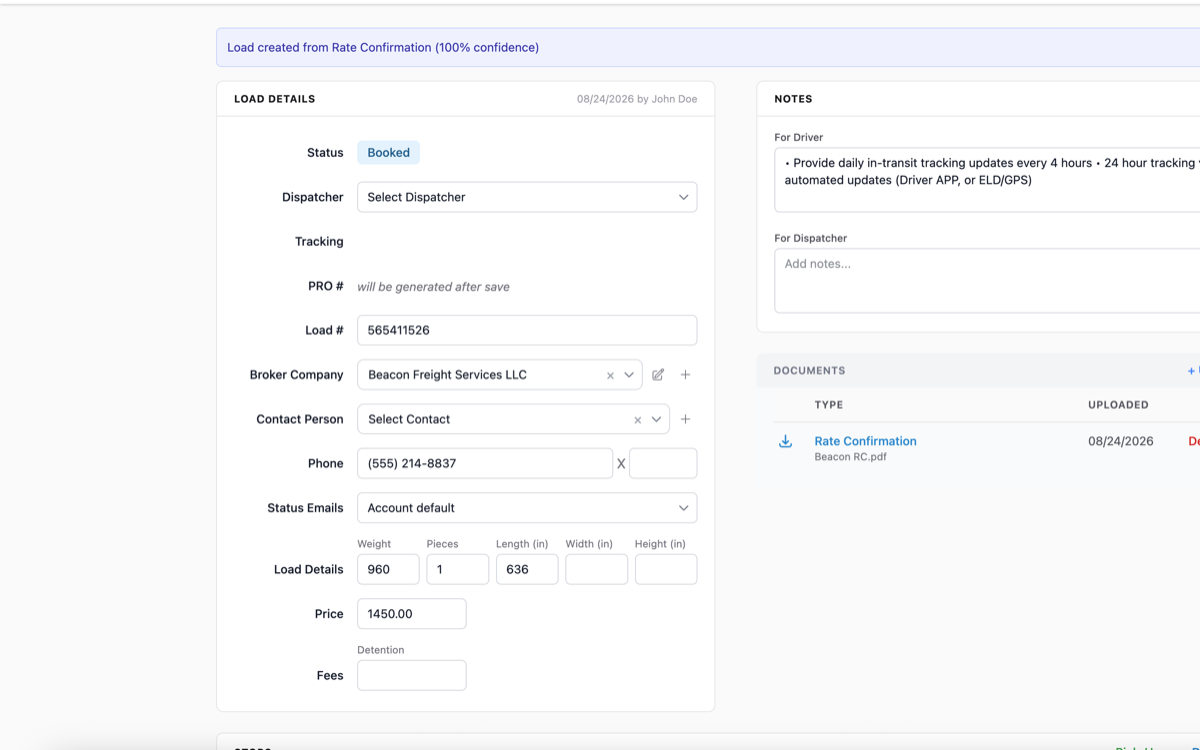
LoadKeeper AutoLoad screen, with the dispatcher uploading a PDF rate confirmation and the AI auto-creating the load

Real screenshot — dispatcher uploads a rate-con PDF; AutoLoad creates the load.

AutoLoad · AI rate-con parsing for dispatchers

Drop the rate-con. The load creates itself.

From your dispatch screen, upload the broker's rate-confirmation PDF. LoadKeeper's AI reads it, creates the load, and fills in every field — origin, destination, dates, broker, price, stops. What used to be five minutes of typing becomes a few seconds of confirming.

  • Upload PDF rate confirmations from your computer
  • AI auto-creates the load with all fields populated
  • Origin and destination addresses
  • Pickup and delivery dates / times
  • Broker company & reference / load number
  • Price, fuel surcharge, accessorials
  • Multi-stop loads with every stop captured
  • Detects and links to an existing load when one matches

Today: dispatcher PDF upload from the web app. Mobile / phone-camera capture isn't supported yet.

Try AutoLoad free for 14 days
Truck Availability Map

The closest van. Ranked by drive time.

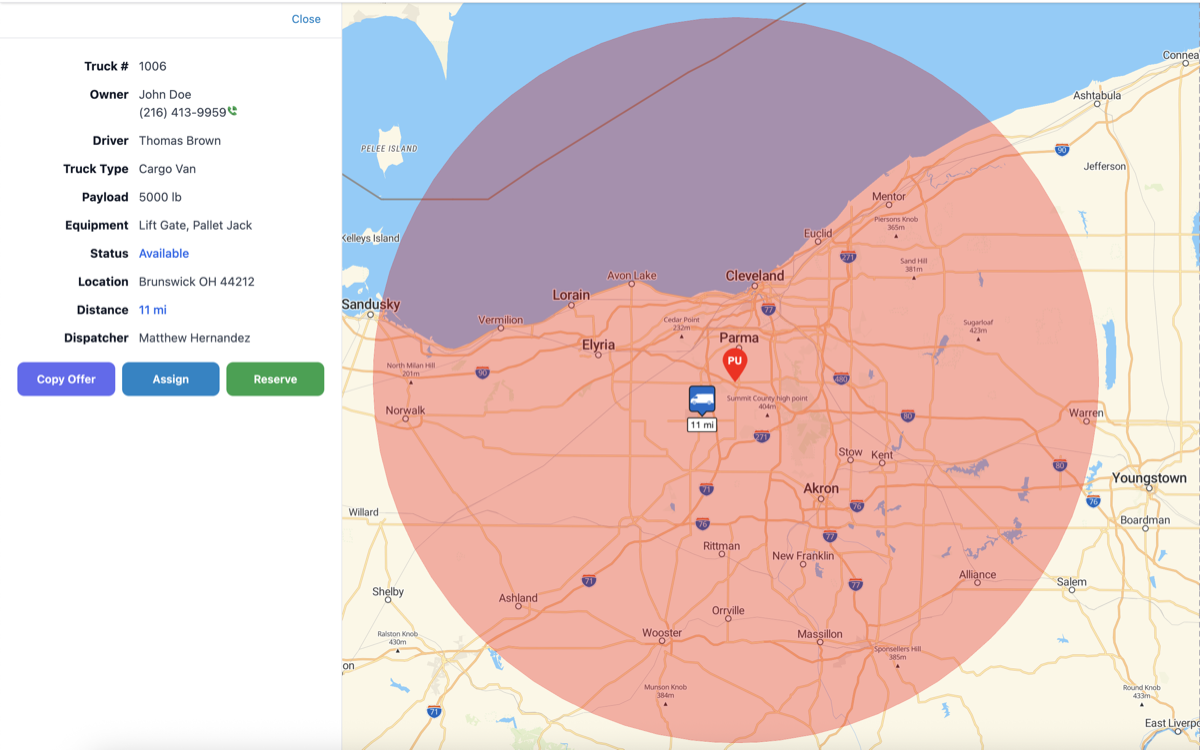
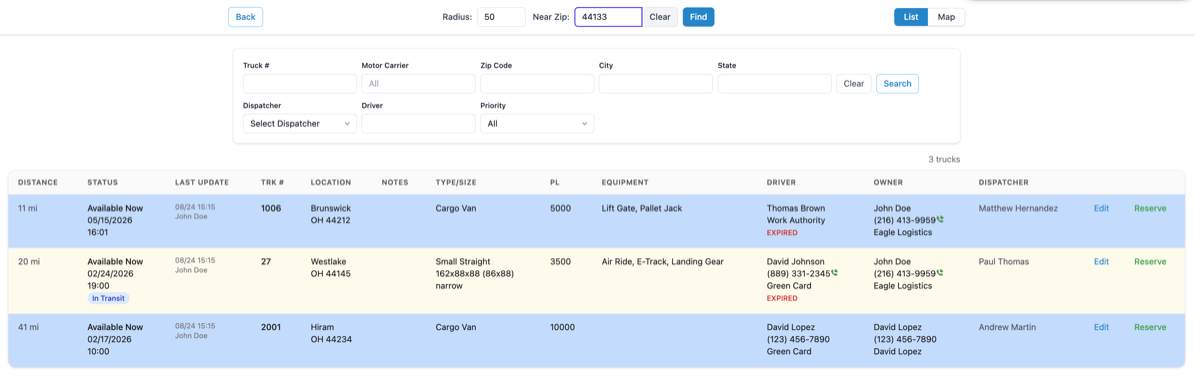
Don't scroll through 80 trucks. Type the pickup zip code — LoadKeeper ranks every available truck by real driving distance from there, on a live map. Reserve the one you want with a countdown timer so two dispatchers don't book the same van.

  • Live map view with real-time truck markers (MapLibre GL)
  • Zip-code radius search, sorted by driving distance
  • OSRM and Google Routes for accurate ETA & mileage
  • Truck reservation with countdown — no double-booking
  • Filter by truck type, equipment, and assigned driver
  • Copy formatted offer text to clipboard for the broker reply

Truck location is dispatcher-entered (last known) — pair with your ELD provider for live GPS pings.

See the map in action
LoadKeeper truck availability map screen with markers ranked by driving distance from a pickup zip code

Real screenshot — truck availability map with zip-radius search.

Inside the Product

Purpose-built modules for every role.

Each module is designed for the way your team actually works — together in one system.

Dispatching Module

Full load lifecycle, one screen.

Multi-stop pickup and delivery, driver assignment, real-time status. The list view gives dispatchers the whole board; the detail view holds the rate con, BOL, and POD.

  • Create loads with pickup and delivery stops
  • Assign trucks and drivers in one click
  • Track Booked → Dispatched → In Transit → Delivered
  • Pre-dispatched shipment management
  • Load update audit trail
Truck #4127 · Service History
86,420 mi
Total YTD
$8,420
Truck Maintenance

Maintenance records by truck, by mile, by receipt.

Every service event lives on the truck it belongs to. Log the date and odometer, add line items for what was done — oil, brakes, tires — and drop the receipt in for the file. When the next service is due or the inspector pulls a maintenance file, you have the full history.

  • Per-truck service history with service date and odometer reading
  • Line-item details by service type (oil, tires, brakes, transmission, …)
  • Total cost summed automatically across line items
  • Attach receipts and shop invoices directly to the record
  • Search service records across the fleet by type, date, or truck
  • Odometer history feeds the next-service-due calculation
Revenue
$124,850
Paid
$98,200
Pending
$26,650
Accounting & Finance

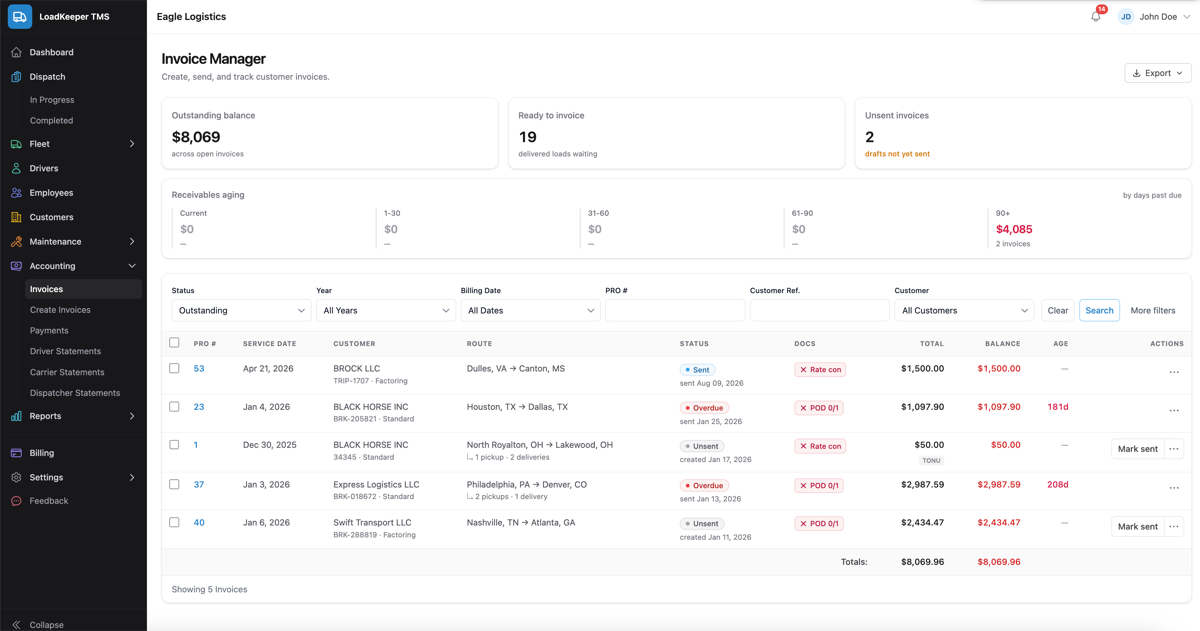
Invoices, statements, and payments — together.

Generate invoices the moment a load delivers. Run driver and owner-operator pay statements with adjustments. Track every broker, every factoring slice, every payment in one ledger.

  • Auto-generate invoices from loads
  • Driver, carrier, and dispatcher statements
  • Adjustments, bonuses, and deductions
  • PDF export and email delivery (Gmail OAuth)
  • Factoring company and quick-pay integration
  • General ledger and payment tracking
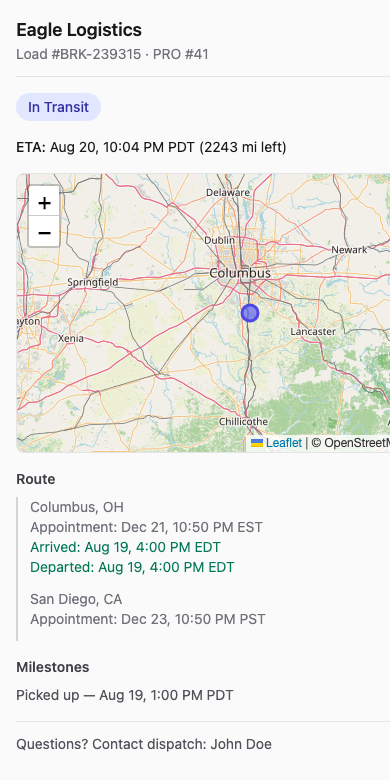
LoadKeeper load detail screen showing live status timeline from booked to delivered with timestamped updates

Real screenshot — load detail with timestamped status updates.

Live Load Status

When the broker asks “where's my load?” you already know.

Every dispatcher status change — pickup confirmed, in transit, delivered — is logged with a timestamp and an optional note. Anyone on your team can answer the broker without picking up the radio or texting the driver again.

  • Status workflow: Booked → Dispatched → In Transit → Delivered → Invoiced
  • Every change is a log entry — who, when, what changed, optional note
  • Same view for every dispatcher — no “I'll have to call you back”
  • Pickup and delivery times captured per stop
  • Search active loads by broker, truck, status, or driver

Honest note: status is dispatcher-driven, not GPS / ELD telematics. The system shows what your dispatcher last entered — pair LoadKeeper with your existing ELD provider for live truck location.

Try the live status view
Driver & Owner-Op Pay

Settlements your drivers can read.

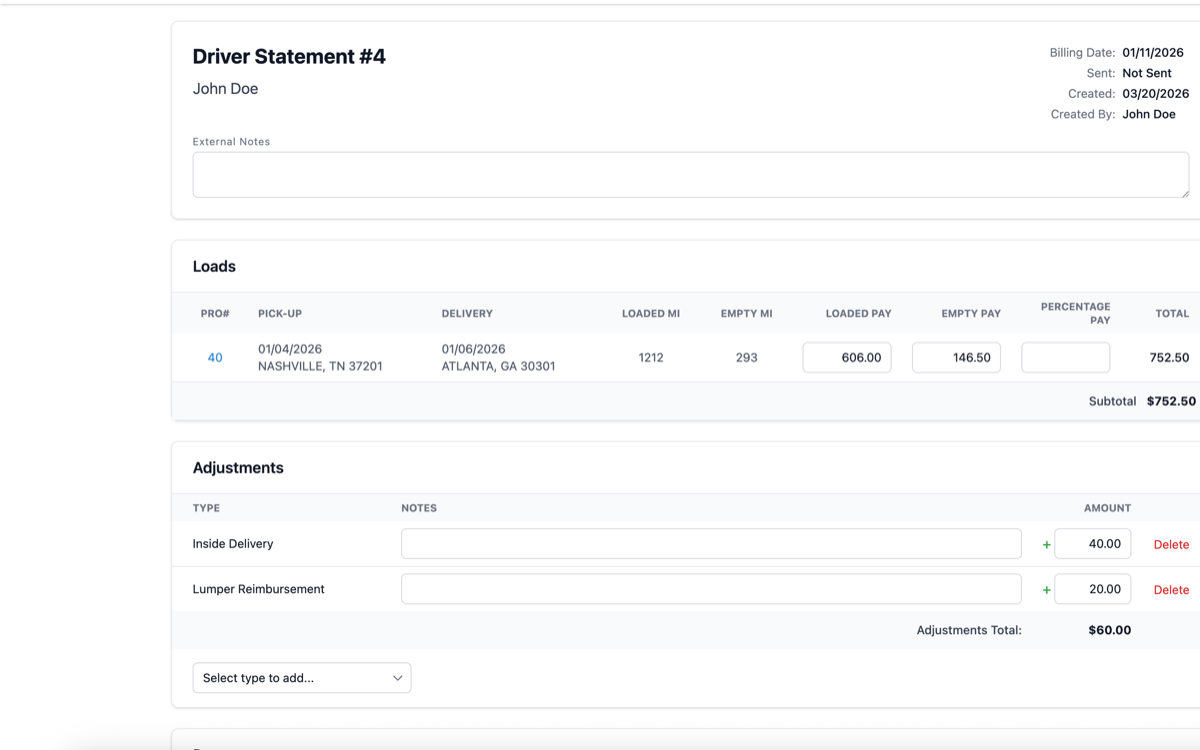
The #1 reason expedited drivers leave isn't pay rate — it's pay disputes. Line-item statements with every load, every adjustment, every deduction end the Friday-afternoon argument. Drivers see exactly how the number got there.

  • Per-load earnings with rate breakdown
  • Adjustments, bonuses, and deductions on the same statement
  • Quick-pay rate options (configurable per driver)
  • Owner-operator carrier statements with the same line-item detail
  • Email as PDF or print — whatever your driver prefers
Run a sample statement
Truck driver reviewing a clear line-item LoadKeeper pay settlement statement at a small office desk

Drivers leave when they don't trust the number. A clean statement keeps them.

Why It Pays Back

Five ways LoadKeeper puts money back on the books.

Concrete levers, not vanity metrics. Numbers below are typical for a 10-truck expedited fleet — your numbers will vary.

7–14d

Faster invoicing

Bill the day a load delivers. Working capital freed: roughly 2–4% of monthly revenue.

10–20h

Hours saved per week

AutoLoad + structured loads. That's a half-FTE you don't have to hire as you grow.

$800–$2k

Per parked-truck day avoided

License, medical, and migration alerts catch renewals before a truck is pulled from service.

$5k+

Per driver retained

Accurate, line-item settlements end pay disputes — the #1 reason expedited drivers leave.

Pricing

One flat price. Everything included.

No per-user fees. No per-truck fees. No tier shuffles. As you grow, the price doesn't.

All-in plan
LoadKeeper TMS
$ 150 / month

billed monthly · cancel anytime

Start 14-day free trial

No credit card required.

What's included

  • Unlimited dispatchers, drivers, and admins
  • Unlimited trucks and dispatchers
  • Full dispatch, billing, pay, and compliance modules
  • AutoLoad AI document parsing
  • Truck availability map with reservations
  • Driver, owner-op, and dispatcher statements
  • Multi-broker and factoring company management
  • Gmail OAuth email delivery
  • Onboarding & data import assistance
  • Email support, no per-ticket fees

What's not (yet) included

We'd rather be honest. These aren't in v1, so you'll keep them with whatever provider you have today:

  • × ELD / Hours-of-Service tracking
  • × IFTA fuel-tax reporting
  • × Native iOS / Android driver app
  • × QuickBooks / Xero direct sync
  • × External load-board API push

If any of these are deal-breakers for your fleet, get in touch — we'll tell you straight.

Flat $150 vs typical per-user TMS

Most TMS platforms charge $30–$60/user or $20–$40/truck per month. The math turns ugly fast.

5 trucks · 3 users
~$240/mo
typical per-user TMS
vs $150 flat
10 trucks · 6 users
~$520/mo
typical per-user TMS
vs $150 flat — save $370/mo
25 trucks · 15 users
~$1,250/mo
typical per-user TMS
vs $150 flat — save $1,100/mo

Industry pricing estimates — check competitors' published rates for your fleet size.

FAQ

Honest answers to the things you'd ask first.

Yes — 14 days, no credit card required. You get the full product for the entire fleet during the trial. If you decide to keep going, billing starts on day 15.
No. $150/month is flat. Add as many dispatchers, drivers, owner-operators, and trucks as you need without paying more. No "Pro" upsell, no usage tiers.
Not today. We focus on dispatch, billing, and pay — the things small expedited fleets actually lose money on. ELD/HOS, IFTA, and fuel tax aren't on the v1 roadmap. Pair LoadKeeper with your existing ELD provider and tax service.
Yes. The platform produces both driver statements and carrier (owner-operator) statements with adjustments, deductions, and quick-pay rates — the way real expedited fleets actually settle pay.
Yes — we'll help you import drivers, trucks, brokers, and active loads during onboarding. CSV templates and one-on-one assistance are included with every plan.

Try LoadKeeper free for 14 days.

No credit card. No per-user fees. Just a real working TMS for your real working fleet.